Solitaire - Brain Training
KST GAMESCard
4.872.00 Reviews
- Version
- 1.8.3
- Installs
- 10.00K
- Age Rating
- Everyone
Screenshots

Our Review of Solitaire - Brain Training
 Analysis by Appyee
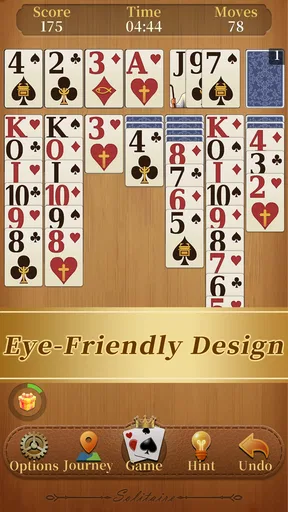
I spent time with Solitaire - Brain Training as a straightforward way to play Klondike on a phone, and its appeal became clear very quickly: it keeps the familiar card game at the center instead of surrounding it with a busy collection of extras. This is a free card game from KST GAMES, aimed at Everyone, and the big-card focus makes it especially interesting for people who find small mobile interfaces tiring.
My overall impression is positive, but quite specific. This is best understood as a calm, traditional Solitaire experience rather than a broad brain-training platform or a feature-heavy card suite. If you want a recognizable Klondike layout that is easy to approach during a short break, it makes sense. If you need deep customization, competitive systems, extensive guidance, or a large variety of card games, you may find its simpler approach limiting.
How the layout feels when readability matters
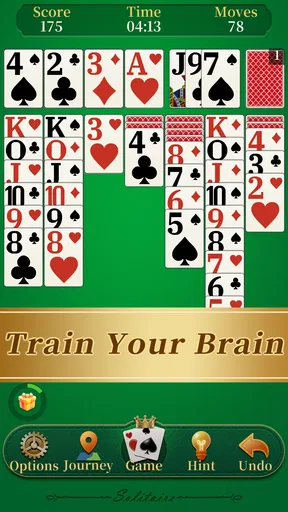
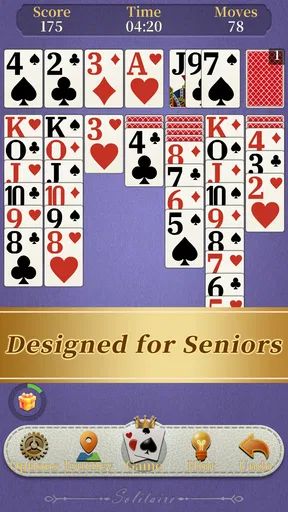
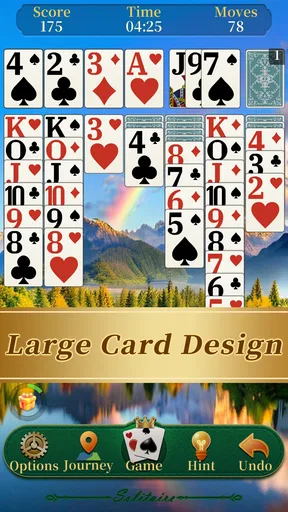
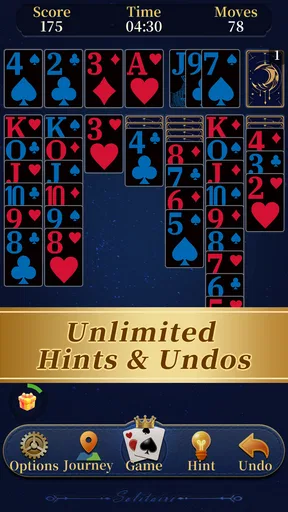
The most important design choice is the emphasis on big cards. In a game where the suit symbols, ranks, and card positions must be read repeatedly, larger visual elements can make a real difference. I found that the board asks less of my eyes than many compact Solitaire layouts, particularly when I was playing on a smaller phone or holding it farther away.
That readability is useful beyond older players. Anyone with tired eyes, changing lighting, or a tendency to lose track of small symbols can benefit from a less cramped table. The game’s straightforward Klondike format also helps because I do not have to learn an unfamiliar board before making a move. The basic objective remains recognizable: uncover cards, build sequences, and organize the suits in order.
Navigation feels most successful when I approach the game with that narrow purpose in mind. I open it to play Solitaire, not to browse through a complicated menu system. That is a strength for people who prefer direct access to the activity. It also reduces the mental load for someone who is uncomfortable with crowded game interfaces or too many competing buttons.
There is a useful distinction here between a readable game and a fully adaptable one. Big cards improve the starting point, but readability also depends on a person’s screen, brightness, eyesight, and comfort with card symbols. I would not treat the large-card presentation as a solution for every visual difficulty. It simply gives the board a more generous visual foundation than a tightly packed design.
Why familiar Klondike helps new and returning players
For a first-time player, the classic format is less intimidating than a collection of unusual Solitaire variations. Someone who learned the game from physical cards can transfer that knowledge naturally to the phone. A returning player can also settle into a round without spending time understanding a new scoring system or an unfamiliar objective.
I think this familiarity matters for people who want a quiet routine rather than a challenge that constantly teaches new rules. A short session can begin with the same mental steps each time: inspect the tableau, look for available moves, and decide which card should be exposed next. That predictability can be comforting, especially when the game is being used as a gentle concentration exercise.
At the same time, the classic structure is not automatically ideal for everybody. Players who enjoy experimenting with different variants may quickly want more variety. The simple format is the reason the game is approachable, but it is also the reason it may feel narrow beside a card app built around many modes.
Practical reading habits that make the board easier
I found that the best way to use a large-card Solitaire layout is to slow down the first inspection rather than tapping rapidly. Before moving anything, I scan the exposed ranks and suits, then check which columns are blocked by face-down cards. This makes the board easier to understand and reduces careless moves caused by focusing on one card at a time.
Another useful habit is to play with the phone positioned steadily on a table when possible. That gives the eyes a consistent distance and leaves a finger free for deliberate taps or drags. It is a small adjustment, but it helps separate visual difficulty from hand movement difficulty. The game cannot control the way every person holds a phone, so the surrounding setup matters.
I also recommend treating short rounds as separate sessions instead of trying to rush through a difficult position. Klondike rewards looking for the move that reveals information, not merely the move that is immediately available. That makes the game more manageable for players who prefer a measured pace and gives the “brain training” angle some practical meaning without turning it into a medical claim.
Using the game with different motor and sensory needs
Card games on a touchscreen can be deceptively demanding. A player may understand the correct move but still struggle with small targets, accidental taps, finger stiffness, or the need to drag a card accurately. The big-card presentation should help with target recognition, and the familiar layout reduces the number of visual decisions competing for attention. Those are meaningful advantages for players who need a calmer interface.
Still, larger cards do not guarantee effortless control. A bigger card can be easier to see while the action required to move it remains uncomfortable for someone with limited dexterity or tremors. I would test the game with the interaction style that feels most natural on the device and avoid assuming that a visible card is automatically an easy card to manipulate.
For players sensitive to visual clutter, the restrained concept is appealing. There is less reason to look away from the table and interpret unrelated game elements. A person who becomes distracted by animated menus, aggressive rewards, or multiple simultaneous objectives may prefer this focused structure.
On the other hand, sensory comfort is personal. A clean card layout may help one player while another needs stronger contrast, larger text beyond the cards, or more control over visual presentation. I would make the phone’s own display adjustments part of the setup: increase system text where appropriate, choose a comfortable brightness, and play in lighting that avoids glare. These steps support the experience, but they are not replacements for dedicated accessibility options.
Where the game can fit into a person’s routine
A realistic use case is a quiet pause between errands. I can imagine someone sitting in a waiting room, placing the phone at a comfortable angle, and playing a few moves without needing sound, social coordination, or a long tutorial. The card format works well for that kind of private, low-pressure activity because the player can concentrate on the board rather than on a complicated narrative.
It can also suit a family member who wants a familiar game on a phone but does not enjoy modern game conventions. Showing that person the large-card layout may make the first conversation easier: there is no need to explain a fictional world or a collection of controls. You can begin with the cards and let the rules do most of the teaching.
For someone using the game as a focus break, I would set a personal stopping point before starting. Solitaire can be relaxing, but an easy-to-open game can also become a way to postpone another task. A short planned session keeps the experience useful as a mental pause rather than allowing it to fill every idle moment.
Situational access on different phones and in different places
The minimum operating system is Android 8.0, which places the game within reach of people using older Android devices that still meet that requirement. That matters for households that do not replace phones frequently. It also makes the game a more realistic option for a spare device used by a parent or grandparent, provided the phone itself remains comfortable to operate.
The game is free, so trying it does not require a purchase decision before the first session. That lowers the barrier for someone who is unsure whether a card layout will be readable or whether the controls will suit their hands. I would still judge it by actual comfort after a few rounds, because a free download cannot compensate for a poor fit between the interface and the player.
Its Everyone content rating also makes the subject matter easy to place in a mixed household. The game is not built around mature themes, and its traditional card format is familiar across generations. That does not tell me how every individual will respond to the interface, but it does make the app easier to recommend as a general-purpose pastime.
In a noisy environment, the value of a visual, turn-based card game is that it does not demand the same kind of constant attention as a fast action title. I can pause mentally between moves and return to the board. That said, I would not use any phone game while walking, driving, or handling equipment. Situational access also means choosing a safe moment and a stable place to play.
What the current release suggests about upkeep
The current version is 1.8.3, and the game has reached over ten thousand installs. Its average rating is 4.8 from roughly three hundred and fifty ratings, with around seventy reviews, which suggests that the people who have rated it generally respond well to its particular style. I read those figures as encouraging, but not as proof that every player will find the controls equally comfortable.
The release date is December 22, 2025, so I would approach it as a relatively recent option rather than a long-established classic in the mobile catalog. That is not a criticism by itself. It simply means I would keep expectations focused on the experience that is present now: a traditional Solitaire game with an emphasis on large cards, not on a long history of accumulated features.
Remaining barriers and the trade-offs behind simplicity
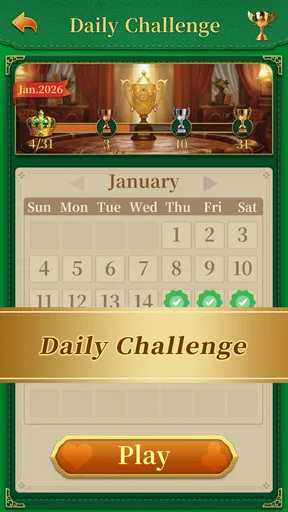
The biggest limitation is the same quality that makes the game approachable: it appears deliberately focused. Players looking for a full training program, detailed progress tracking, competitive leaderboards, daily challenges, or a wide library of card variants should compare it with more elaborate Solitaire alternatives. Those apps may be better for people who need ongoing goals or more ways to stay engaged.
There is also a difference between being easy to understand and being fully customizable. A large-card design is helpful for many users, but some people need control over contrast, card style, text scale, orientation, or input behavior. I would not choose this game solely because its cards are described as big if those specific adjustments are essential to your comfort.
Players with significant motor limitations may face a separate challenge. Solitaire still requires selecting and moving individual cards, and a touch screen does not provide the tactile boundaries of a physical deck. If precise tapping or dragging is difficult, a game designed around alternative input methods may be a better match. This is one area where a traditional phone layout can remain demanding even when it looks uncluttered.
Another trade-off concerns mental stimulation. The title presents itself as brain training, and Klondike certainly involves planning, visual scanning, memory of exposed cards, and decision-making. I enjoy that aspect, but I would treat it as an informal cognitive activity, not as a substitute for structured therapy, assessment, or professional advice. The game is most convincing when it stays honest about being a card game that makes you think.
How it compares with physical cards and richer alternatives
Compared with a physical deck, the phone version is more portable and easier to start when I am alone. I do not need a table large enough for several columns, and I can carry the game without carrying cards. The trade-off is that the touchscreen offers less tactile feedback and may be harder for someone who relies on feeling the edges of each card.
Compared with busy Solitaire apps, this one is more suitable for a player who wants less interruption and less learning overhead. A feature-rich alternative can offer more replay variety, but it may also make the experience feel like a reward system rather than a quiet card break. I would choose based on the reason for playing: calm repetition favors this game, while long-term variety favors a broader app.
Compared with other casual brain games, Klondike has a slower rhythm and a familiar rule set. That makes it a good choice for someone who dislikes timed puzzles or rapid reactions. It is a weaker choice for a player who wants measurable lessons, escalating exercises, or a clearly structured curriculum. The mental work here comes from the decisions within each deal, not from a formal training path.
Who should try it, and who should skip it
I would recommend it to people who want a free, recognizable Solitaire game with cards that are easier to see than cramped layouts. It is particularly worth trying for older players, people who prefer simple navigation, and anyone who wants a quiet activity during a short break. The Everyone rating and low entry cost also make it easy to test in a shared household.
I would be more cautious about recommending it to players who need extensive accessibility controls, alternative input support, or strong customization. I would also point frequent Solitaire enthusiasts toward a richer alternative if they expect many variants, detailed statistics, or a steady stream of new objectives. This game’s value depends on appreciating its narrow focus.
One practical test is to play a complete short session in the conditions where you will actually use it. Try it in your usual lighting, with your normal grip, and at the distance you find comfortable. Notice whether you can identify suits without squinting and whether moving cards feels controlled rather than tiring. That tells you more than a rating alone.
After using it, my inclusive verdict is that Solitaire - Brain Training is a clear and approachable choice for traditional Klondike play, especially when card readability matters. Its big-card emphasis, familiar rules, free price, and Everyone rating create a welcoming starting point for a broad audience. KST GAMES has kept the idea easy to understand, which is exactly why it can work well for a relaxed daily routine.
I would not call it universally accessible, because visual comfort and touch control still depend on the player and the phone. Nor would I choose it for deep progression or variety. But if your priority is a calm card table that feels familiar, avoids unnecessary complexity, and gives the cards room to be seen, I think it is worth installing. The best reason to choose it is not the promise of a dramatic training system; it is the simple pleasure of making one thoughtful Klondike move at a time.
Verdict
Strengths of Solitaire - Brain Training
- Relaxing gameplay suitable for short or extended sessions.
- Multiple solitaire variations help keep the experience fresh.
- Simple controls make it accessible for players of all ages.
- Daily challenges provide an extra reason to return regularly.
- Offline play is convenient when no internet connection is available.
Limitations of Solitaire - Brain Training
- Frequent ads may interrupt games, especially between rounds.
- Some advanced features may require in-app purchases.
- Limited social interaction compared with multiplayer card games.
- Difficulty can feel inconsistent across certain challenges.
- Battery use may increase during longer play sessions.
Similar Picks in This Category
View All
Solitaire - Classic Card Games
MobilityWare4.6

UNO!™
Mattel163 Limited4.3

Spider Solitaire: Card Games
MobilityWare4.6

Solitaire.com - Classic Cards
Tripledot Studios Limited4.7

Plants vs. Zombies™ Heroes
ELECTRONIC ARTS4.1

Hearthstone
Blizzard Entertainment, Inc.4.1
Frequently Asked Questions
What is Solitaire - Brain Training?
Solitaire - Brain Training is a digital card game based on the classic Klondike solitaire format, designed to provide short and relaxing gameplay sessions while also exercising concentration, planning, and problem-solving skills. Players arrange cards in the correct order and suit, usually with the goal of clearing the tableau. Its simple rules make it suitable for both beginners and experienced solitaire players.
How do you play Solitaire - Brain Training?
The main objective is generally to move all cards to the foundation piles, organizing them by suit from Ace through King. Cards on the tableau are arranged in descending order with alternating colors, while hidden cards can be revealed by moving visible cards strategically. The game may offer hints, undo options, daily challenges, or different difficulty settings, depending on the version installed on your device.
Can Solitaire - Brain Training be played offline?
Many solitaire games allow users to play basic rounds without an internet connection, which is convenient when traveling or when mobile data is unavailable. However, features such as advertisements, cloud synchronization, leaderboards, daily challenges, updates, or reward systems may require internet access. Before downloading, it is worth checking the app-store description and testing which functions remain available in offline mode.
Is Solitaire - Brain Training free to download and use?
Solitaire - Brain Training may be available as a free download, but free access can include advertisements, optional purchases, or limitations on certain features. In-app purchases may provide ad removal, additional themes, hints, or other conveniences. Users should review the pricing information on the Google Play Store or Apple App Store and check whether subscriptions are offered before confirming any purchase.
Is Solitaire - Brain Training suitable for improving memory and concentration?
Solitaire can encourage concentration, visual attention, planning, and logical decision-making because players must evaluate possible moves and anticipate how each action affects the remaining cards. Nevertheless, it should be viewed as entertainment rather than a proven medical or educational treatment. Results vary between players, and regular mental activity, healthy sleep, exercise, and other forms of learning are also important for overall cognitive wellbeing.
Play our best games!


